


Creating a website without a content plan is like building a house without blueprints: messy, inefficient, and unlikely to support long-term growth. A website content plan is a strategic framework that outlines what content your site needs, who it’s for, and how it aligns with your business goals.
Creating a strategic content plan for your website ensures that every landing page, blog article, and call-to-action works together to drive meaningful results. The data is clear: growth-driven websites backed by a structured content marketing strategy see 25% increase in sales qualified leads and are 13x more likely to achieve a positive ROI over time.
This article is for marketers, business owners, and content creators who want to stop guessing and start building a website that fuels growth. You will get a step-by-step guide to creating a strategic website content plan and a free downloadable template to help you get started.
Download the website content template here →
1. Define your website type to build the right content plan
“What type of website are you building?” isn’t a fluff question, it’s the foundation of your entire content strategy.
Different website types serve specific core business functions, which directly shape your content goals, page structure, user flows, performance metrics. The nature of the website also impacts the resources you will need for development and content production.
💡 Example
A local service-based business (like a dental clinic or interior design firm) typically needs a streamlined website focused on local SEO, a clear description of services offered, and lead conversion. It usually works best with a handful of high-impact pages (homepage, services, about, contact).In contrast, a B2B SaaS website will need a more layered approach. The website structure includes feature breakdowns, pricing pages, gated content, integration overviews, blog content for education and SEO, and more.
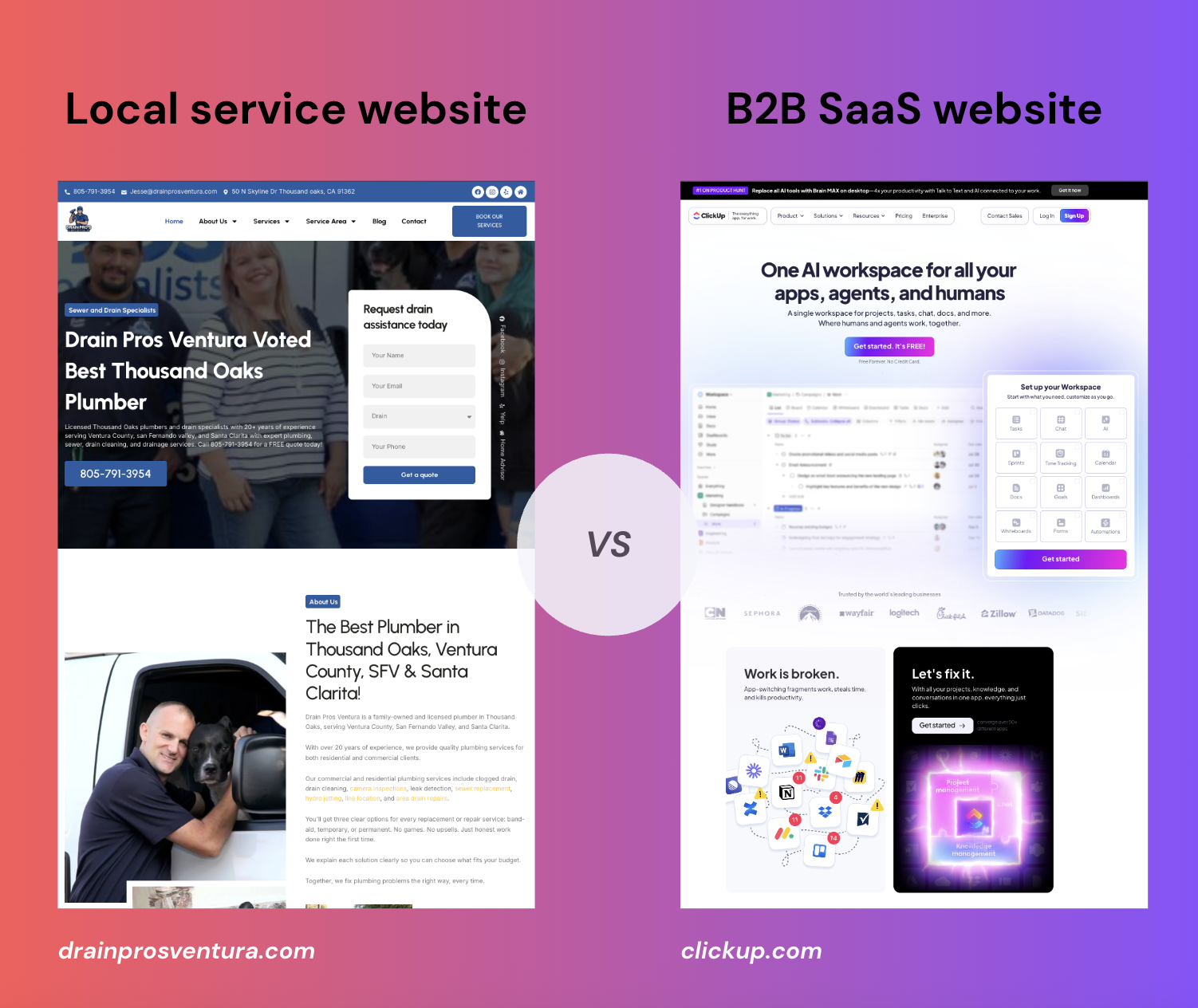
If you don’t align your content plan with the type of website you’re building, you're likely to track the wrong KPIs and waste resources producing irrelevant content format. Most importantly, you run the risk of disconnecting your content from your business goals, meaning your website might look good but fail to drive real results.
Let’s compare two common website types to show how defining your site upfront transforms your entire content plan:
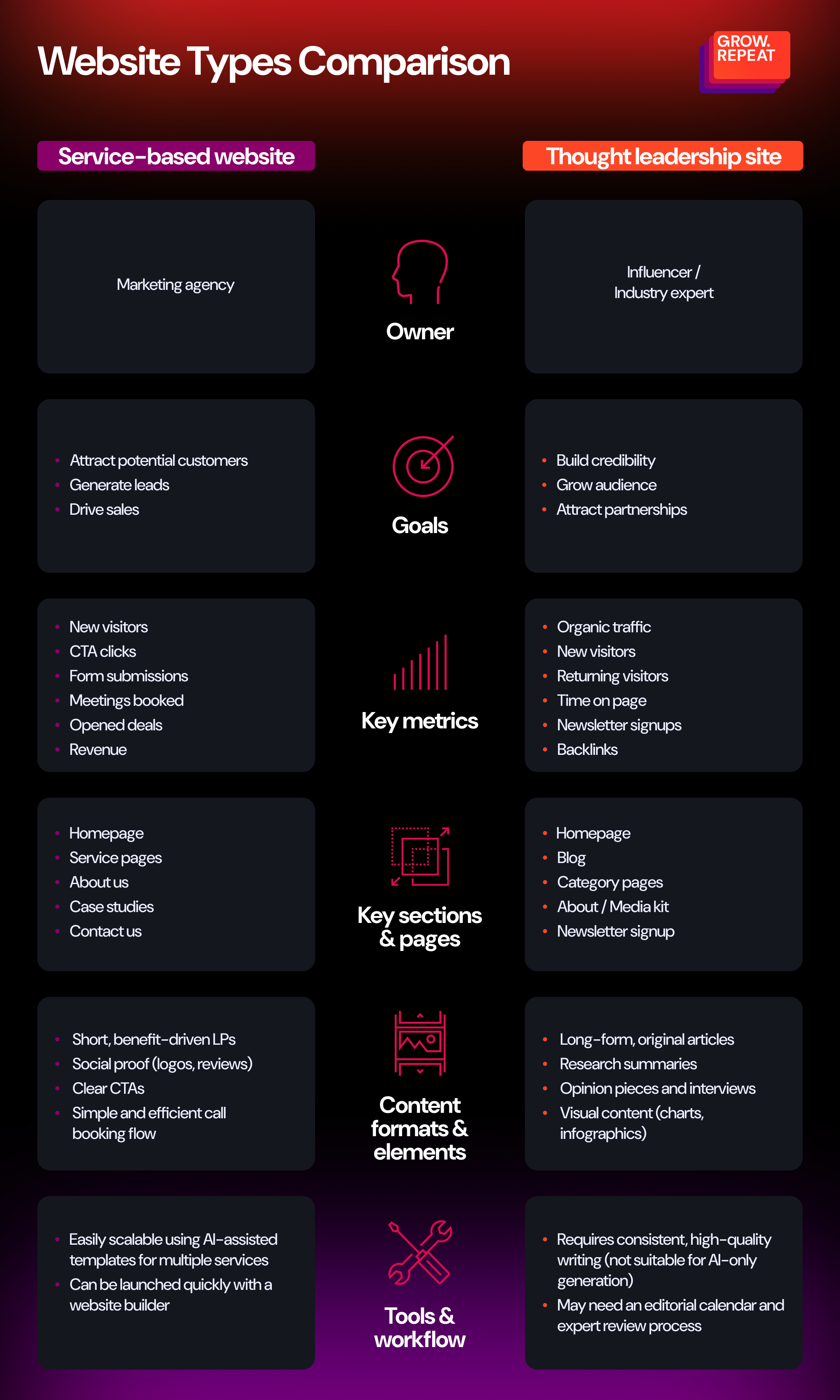
Trying to apply the same content plan to both types can lead to major issues. Imagine writing 20 blog posts for a local service website where only five core landing pages would convert better. Or, in another instance, using AI to mass-produce content for an expert blog that demands original insights and authority.
Here is an infographic that shows the most common types of websites with their goals, metrics, and structure:
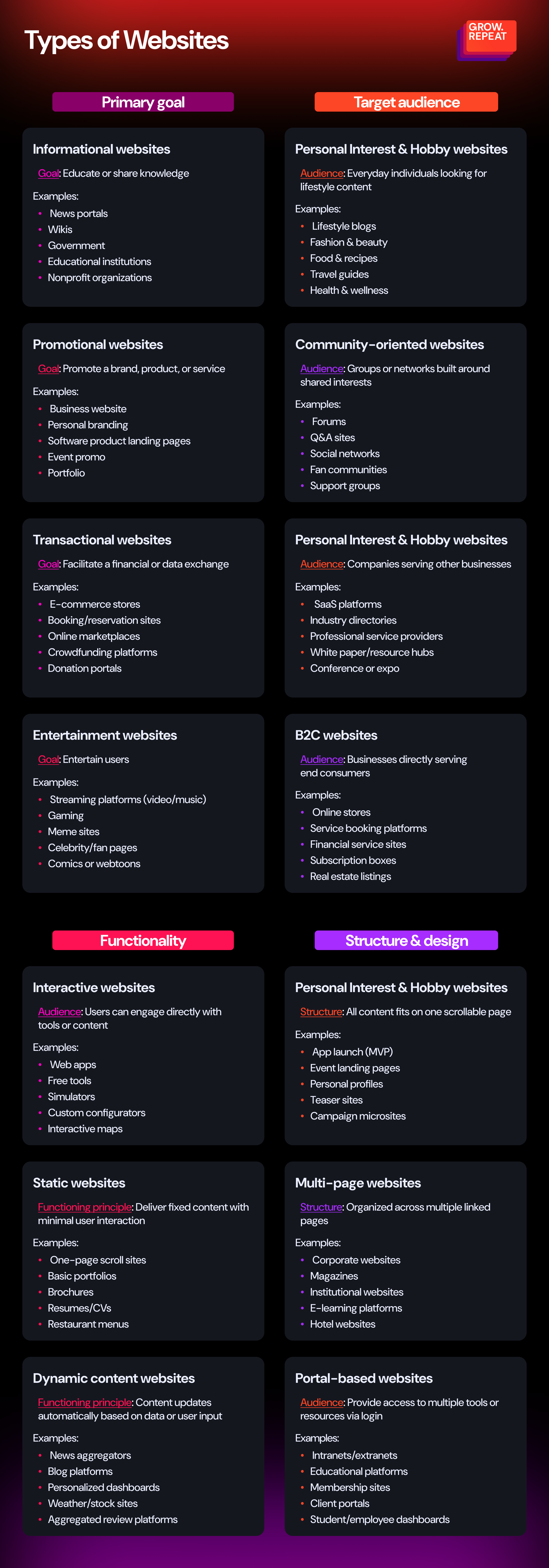
Once you understand what type of website aligns with your industry, goals, target audience, and resources, you can focus on the next step: building a customer journey and conversion funnel.
2. Set website goals & audience segments
Most websites underperform because they treat all visitors the same. To build a site that converts, you need to define precise business goals, align them with user intent, and then create content that systematically moves people through your funnel.
Let’s walk through the key steps you need to get right from the start.
Clarify your website’s primary objective
Don’t start with “We want a website.” Start with: “We want our website to accomplish X.” Define a measurable objective tied directly to your business strategy.
Here are a few examples of goals with targets and tactics that you can implement to achieve them:
Goal 1: Generate qualified leads
Target: Convert 5% of targeted visitors into email subscribers or booked calls.
Tactic: Use a segmented lead magnet system that maps lead magnets to traffic sources (example: Facebook Ad > Free Audit PDF vs. Organic Search > SEO Checklist).
Goal 2: Drive direct sales
Target: Achieve a 2%+ conversion rate from page visitor to sales meeting for a specific product.
Tactic: Build a dedicated sales funnel with a product detail page, urgency-driven offer, dynamic FAQs, and retargeting email automation.
Goal 3: Establish topical authority
Target: Rank in the top 3 for 10+ transactional keywords in your niche.
Tactic: Publish a content hub with long-form, interlinked blog posts and schema-optimized landing pages targeting transactional queries.
Content without a clear purpose isn’t just neutral, it actively dilutes your message, confuses your visitors, and wastes resources. Once your goals are clearly defined, make sure that every piece of content in your website plan serves a strategic function: guiding the right audience toward a specific action that contributes directly to your overall objective. If it doesn’t, it doesn’t belong.
Identify target audience segments
Don’t create “content for everyone.” Instead, build for specific user segments with defined goals. Asking the right questions will help you navigate this process with clarity:
What role does the visitor hold (decision-maker, researcher, current customer)?
What pain point or motivation brought them to this page?
What do they need to believe to move one step closer to conversion?
By understanding each segment’s mindset and intent, you can craft targeted experiences that speak to their priorities.
Let’s look at how this could play out with a B2B SaaS website:
Segment 1: Chief Technology Officers who are evaluating features/security -> Needs technical documentation, case studies, SOC 2 compliance details.
Segment 2: Mid-level managers who are comparing tools -> Needs benefit-driven use cases, ROI calculators, competitor comparison pages.
Segment 3: Current customers who need quick access to tutorials, feature updates, and support docs.
Defining the right audience segments helps you design intent-based landing pages as tailored entry points. The content on these pages will match the visitor’s marketing funnel stage.
3. Plan resources for content production and the website update
Effective content planning starts with one crucial question: do you have the right resources to execute your vision at the scale and quality you need?
Let’s break down how to think strategically about resource planning so your website content production isn’t just ambitious, but also achievable.
Define the volume of content and your available resources
Start by mapping the scope of the efforts required for your website. Are you overhauling five core service pages, or building out 50+ long-tail landing pages and blog posts?
The size of your content workload directly impacts the team structure, tooling, and budget allocation:
Who is on your team? Map out the internal and external contributors involved in the project. This includes in-house specialists (content strategists, writers, designers, developers), as well as external partners like SEO consultants, freelance writers, or a web development agency. Clarifying roles early helps to prevent resourcing gaps, avoid overlap of responsibilities, and ensure accountability at every stage.
What’s your real working budget? Avoid ballpark figures. Establish a realistic, per-piece budget that accounts for all production costs: strategy, copywriting, visual assets, SEO optimization, and potential revisions. This allows you to prioritize high-impact content and avoid going outside of your scope.
What tools will power your workflow? Identify the platforms and software that will streamline collaboration and production. Think beyond just your CMS (include AI content assistants, design tools, SEO plugins), but don't overload your tech stack. Choose tools that integrate well and support your team’s existing workflows, not ones that add friction.
💡 Tip
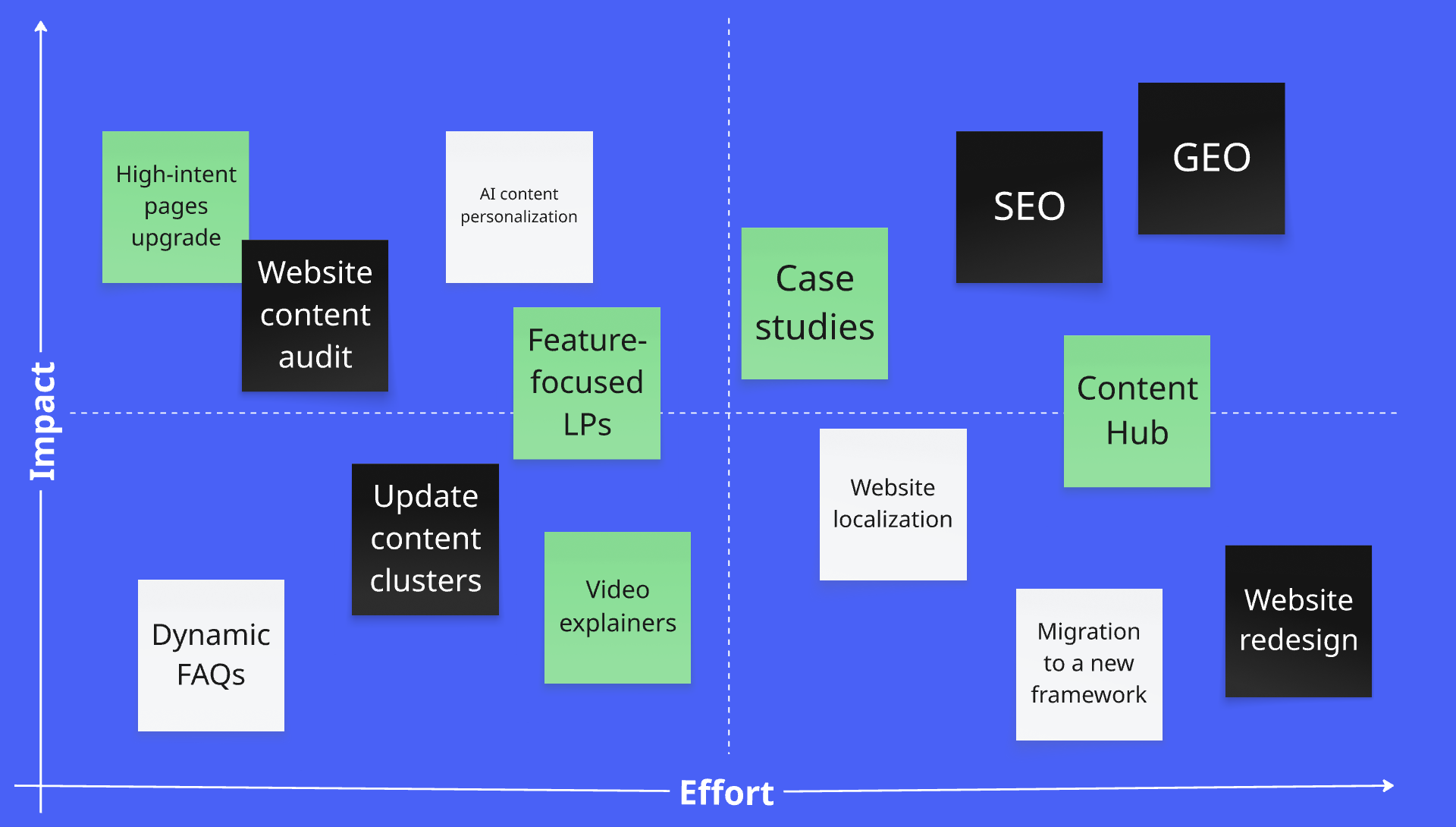
Use a content effort matrix (high value - high effort / low value - low effort) to prioritize content initiatives:Here is how to evaluate:
Low effort + high value: these are your quick wins (easy to implement, high return).
Low effort + low value: worth testing if you have capacity.
High effort + high value: plan these as long-term investments for lasting impact.
High effort + low value: unless there is a strategic reason, consider removing or rethinking them.
Use tools like Miro to visualize the matrix and facilitate real-time brainstorming with your team. It’s especially useful during planning sessions or content sprints.
Assess content scalability and automation
Next, determine whether your content approach must scale or specialize. This decision shapes how you allocate creative vs operational resources.
Content needs typically fall into two categories:
Scalable content: if you're producing near-identical content for multiple locations, products, or services (example: “plumber in [city]” pages or product descriptions), efficiency is key. Templates, AI automation, and batch production become essential.
Expert-driven or custom content: if each content piece requires deep subject-matter expertise (example: niche how-to guide, industry study, B2B thought leadership article), scalability is less important than originality, precision, and authority.
.png "Expert-driven content (1)")
Assess which parts of your content process can be templatized or AI-assisted, and which require thorough human input.
Consider this tiered approach:
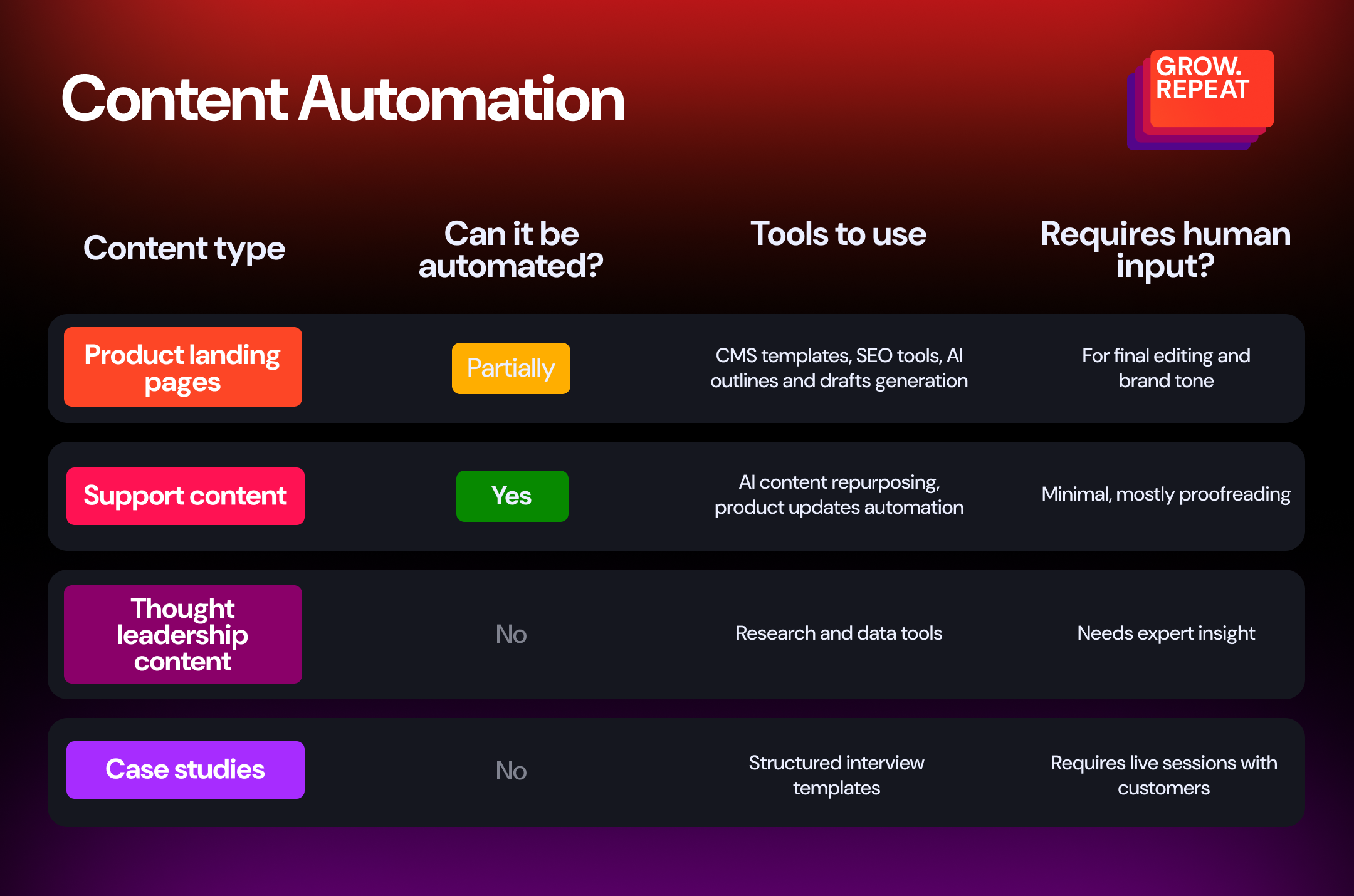
A strategic balance of scalable content and expert-driven pieces allows you to move quickly without sacrificing quality. Combine various tactics to support both short-term momentum and long-term growth.
4. Build a website structure that supports your funnel
A website isn’t just a collection of pages, it’s an experience that guides visitors toward a purpose. Whether that’s converting leads, educating users, or selling a product, the website structure plays a powerful role.
Structure the website to serve your strategic goals
Website structure should reflect your business priorities. Start from the end: what do you want your users to do? Then reverse-engineer the structure to support that.
A strategic website structure should:
Reflect your top 1-2 conversion goals prominently.
Prioritize user intent across the funnel, from awareness to decision.
Surface the right content at the right depth of navigation.
Here are a few examples:
If your priority is lead generation, your homepage should lead directly to high-intent pages like service overviews or case studies, not just blog posts or mission statements.
If your goal is product activation, make the sign-up or demo path visually dominant and frictionless.
💡 Tip
Identify your 3 highest-value actions (for example: download a lead magnet, sign up, book a call), then ensure at least one path from every core page leads to one of them.
Align pages with the funnel
Effective websites are designed to meet users where they are in their journey and move them forward with purpose. That means structuring content by funnel stage, assigning KPIs, and deploying the right formats at the right moments.
Awareness (TOFU – Top of Funnel)
At this stage, your audience is either just becoming aware of a problem or starting to explore possible solutions. Your job is not to sell, it’s to educate, attract, and engage. Content should answer the questions your audience is already typing into Google or asking peers in Slack channels.
💡 Example
A blog post titled “How to improve your team’s weekly reporting (+ free Google Sheets template)”. It ranks for a practical search term and delivers instant value that builds trust.
Consideration (MOFU – Middle of Funnel)
Here, users are actively comparing solutions and your content must help them evaluate options, validate their thinking, and move closer to a decision. This is where trust is either earned or lost. Create content that differentiates your offering, positions your expertise, and answers the unspoken objections swirling in your prospect’s mind.
💡 Example
A blog post or a landing page “[Your Tool] vs. [Competitor]: which is best for remote teams?” paired with an interactive calculator that lets users quantify the ROI of choosing your solution.
Decision (BOFU – Bottom of Funnel)
By this point, your audience is nearly ready to act. They just need the right nudge. The focus here is on eliminating friction, reinforcing urgency, and making conversion easy. Content should directly support action: purchasing, booking a demo, starting a free trial, or speaking to sales.
💡 Example
A page presenting a limited offer: “Get 20% off annual plans + free migration (ends Friday)”, with social proof, live chat support, and a streamlined checkout experience.
Retention (Post-Purchase)
The funnel doesn’t end at conversion, it extends into retention, upselling, and advocacy. Great post-purchase content increases product adoption, reduces churn, and nurtures long-term customer loyalty.
💡 Example
A help article “Get more from your plan: advanced automation tactics you’re not using yet” with embedded videos and pro tips tailored to their usage level.
It’s crucial to align business goals with your audience’s intent and business goals to define the content formats you need to create and publish on your website.
Here is a visual breakdown of how that alignment can work in practice.
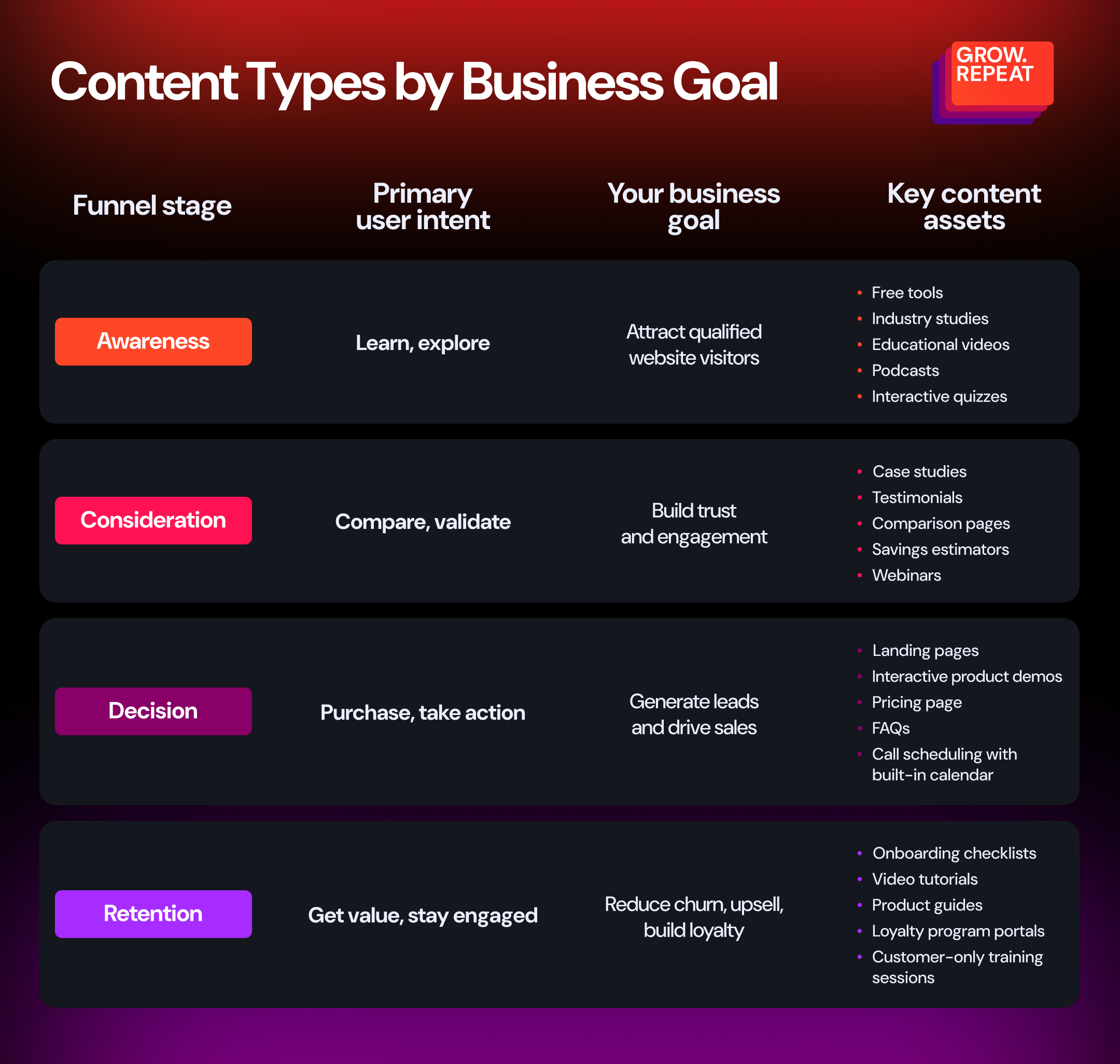
Now that your funnel is mapped and aligned with business goals, it’s time to turn strategy into execution. Let’s look at how to plan your content production resources effectively to prioritize the right pages, assign responsibilities, and bring your customer journey to life across your actual website.
Tips to build an efficient website structure and UI
To take your website from “good enough” to truly high-performing, consider these advanced, strategic tips:
Think in paths, not pages: users don’t navigate linearly. Think about how someone flows from problem-aware to solution-ready. Structure your menus, call to actions, and internal links accordingly.
Use hub-and-spoke models: for large content areas, use parent hub pages that link out to focused subpages. This helps SEO and user comprehension.
Limit top-level menu items: the paradox of choice is real. Keep navigation focused, and avoid overwhelming users with too many options at once.
Make conversion paths redundant: users should be able to reach your top goals (like booking a call) from multiple entry points, not just the homepage.
Adjust based on real behavior: use tools like Clarity or Hotjar to audit how users interact with your current structure. Run A/B tests to compare variations and continuously refine based on real data, not guesswork.
Platforms like FlowMapp can help you plan, structure, and manage website content, user flows, and sitemaps in a collaborative and visual way.
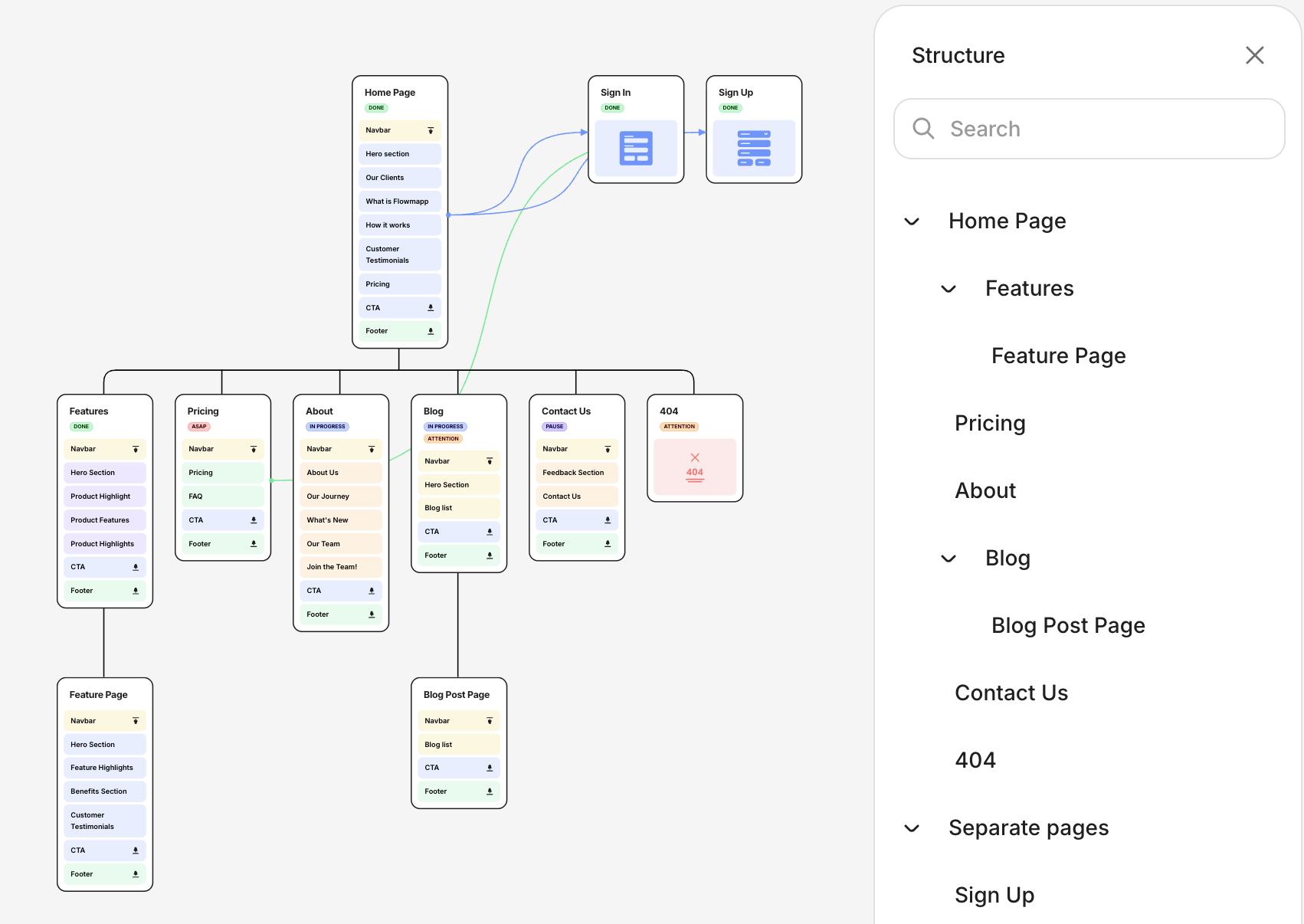
When your structure is purposeful and aligned with how users think and act, your content becomes exponentially more powerful. Don't treat structure as a technical necessity, it’s your silent sales engine. Take the time to get it right.
5. Content clusters: define core website topics
A content cluster is a structured group of related pages that revolve around a single, well-defined topic:
Pillar page is the main authority page covering the core topic comprehensively.
Related pages dive deeper into subtopics, use cases, or questions related to that core topic.
Internal linking connects all of these pieces together, signaling to search engines that you're the expert on this subject.
From an SEO perspective, content clusters are a game-changer.
Search engines prioritize topical depth and semantic relevance. By organizing your content into internally linked, strategically optimized clusters, you make it easier for crawlers to understand the relationships between topics, signaling that your website is a credible, authoritative source within your niche.
How to define effective content clusters
Creating strong clusters is a strategic process that bridges your offerings with your audience’s intent. Here’s a workflow that you can follow to define meaningful and high-performing content clusters:
Start with your value proposition. List your core products, services, or solutions. Then, identify the core problems they solve. These become your strategic topics because they directly support revenue and positioning.
Research real audience demand. Now, explore how your audience searches for your strategic topics. Use keyword and intent research tools to identify common questions and subtopics. Prioritize terms that match where your audience is in the buying journey.
Map out your content cluster structure. Create pillar pages covering your strategic topics and related pages covering subtopics, common questions, or niche angles. Link the pillar and related pages to unify the cluster.
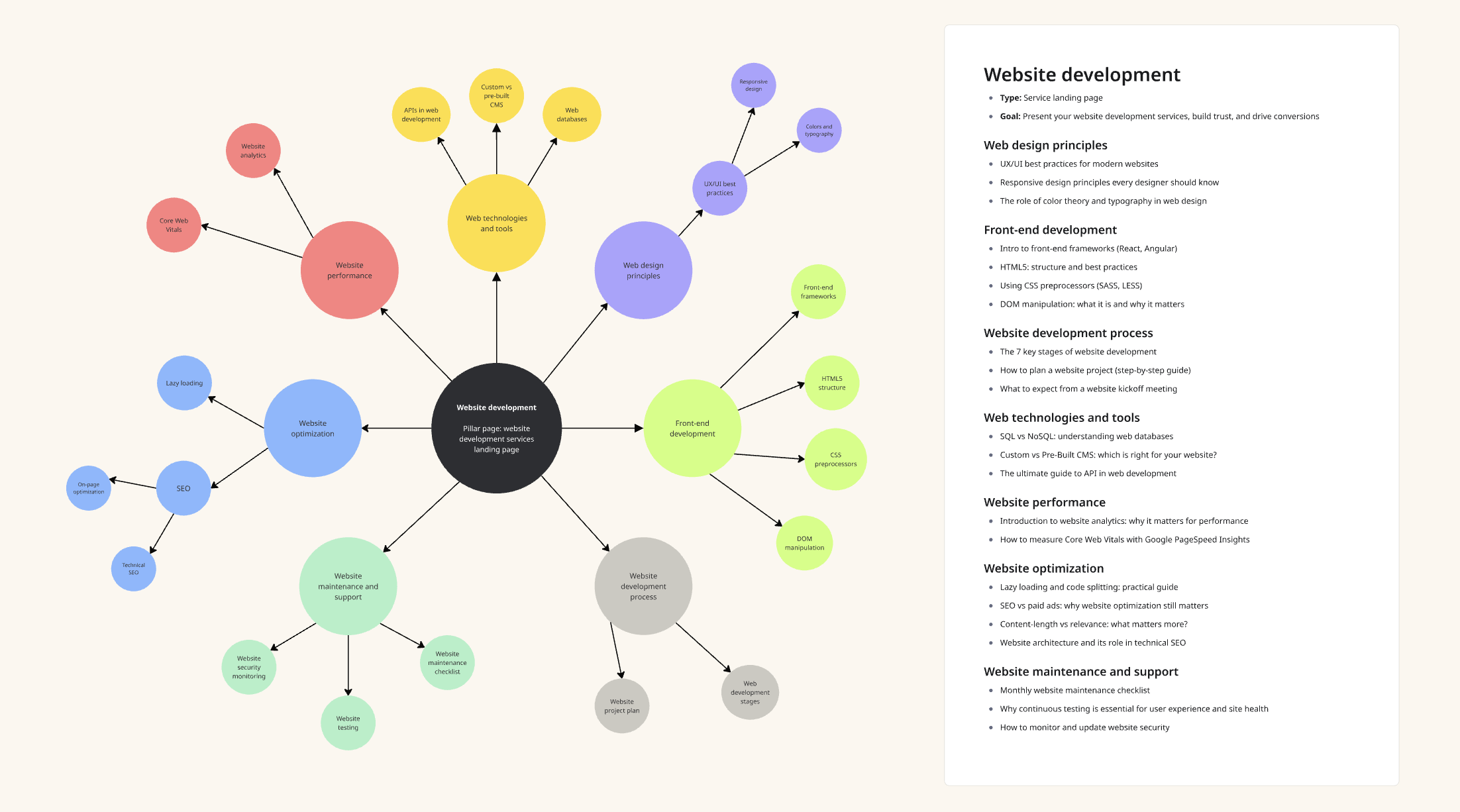
💡 Example
Product: “Website development services for B2B companies”
Pillar page: landing page “B2B website development services”
Related pages:
Listicle post “10 must-have tools to build a great B2B website“
How-to post targeting mid-funnel users “How to plan a B2B website redesign that actually converts leads”
Decision-making piece “In-House vs. Agency: what’s the best approach to B2B website development?”
Trust-building asset showing real results: “Case study: how we helped a B2B SaaS company increase demo requests by 72% with a full website rebuild”
How to choose cluster topics from an SEO perspective
While your business priorities guide the themes, SEO data helps you choose the best angle for each cluster. The goal is to balance search volume, intent, and competition.
Here is what to look for:
Keywords with consistent monthly volume should anchor your pillar topics. These are the topics that generate demand and can drive sustainable traffic. On the other hand, niche or zero-volume keywords may not attract large audiences, but they often capture high-intent users. Reserve these for related pages within your content clusters.
Clear search intent: align topics with what users are trying to achieve. Map learning content to informational keywords, comparisons to commercial keywords, and buyer guides to transactional keywords).
Moderate to low competition: use keyword difficulty scores to spot opportunities you can realistically rank for, especially if your domain authority is still growing. Lower scores means that it will be easier to rank for that keyword, i.e. there is much less competition.
Semantic relevance: choose terms that naturally connect to your main topic, even if they’re not exact matches.
Go narrow and deep on a topic cluster to own your niche, rather than trying to compete broadly in a saturated category.
Here are several tools that you can use for keyword research and clusters building:
Semrush: for keyword volume, difficulty, and related terms.
Ubersuggest: a budget-friendly option for long-tail keyword ideas.
AnswerThePublic: great for uncovering question-based search queries.
Surfer: for optimizing pillar and cluster pages based on SERP analysis.
MarketMuse: for in-depth topic modeling and competitive content analysis.
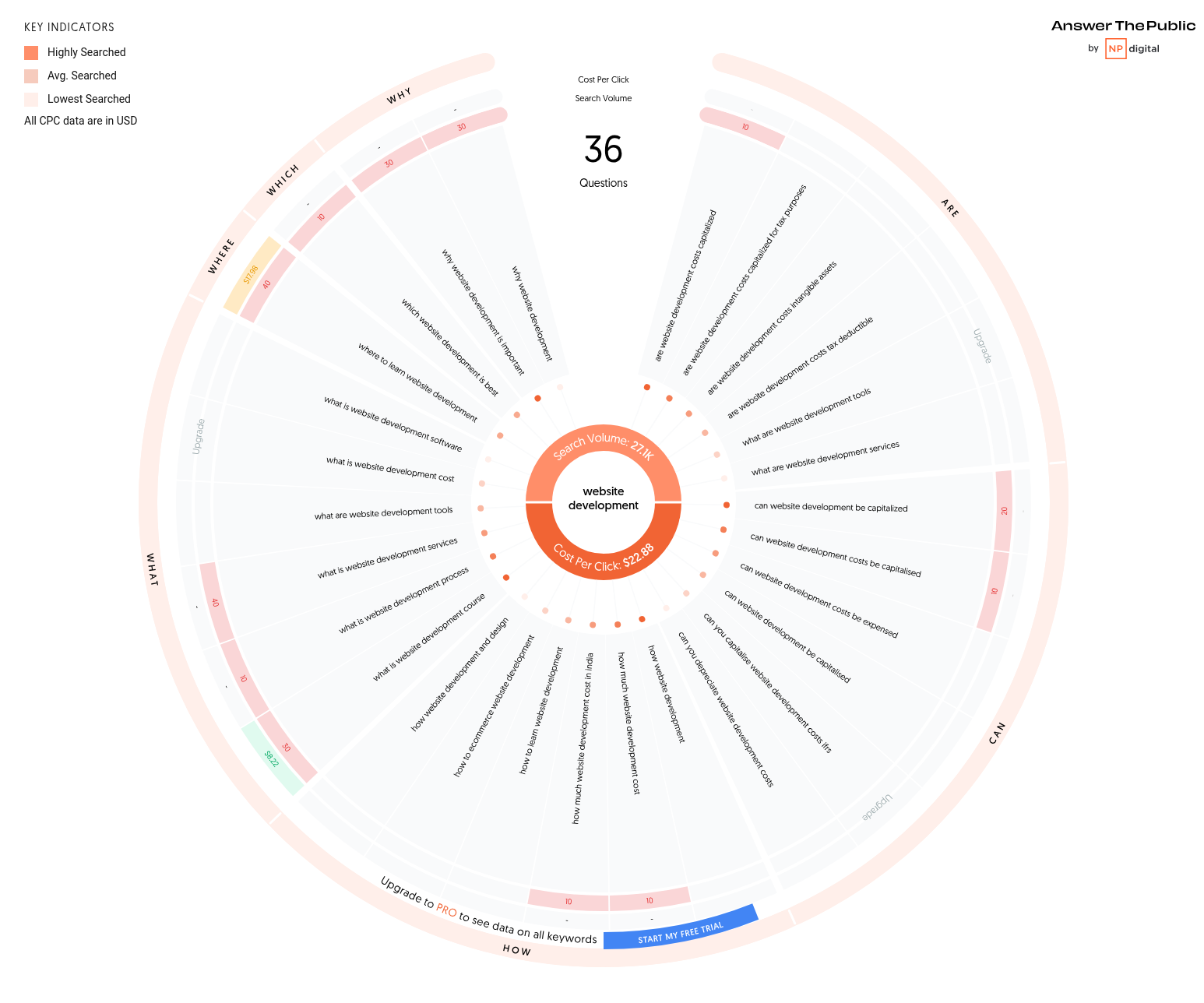
When you define content clusters with precision, you build a website that doesn't just rank. It converts and builds authority over time.
6. Creating a website content model and roadmap
Once your strategy, goals, audience segments, and funnel-aligned website structure are clearly defined, it’s time to translate that foundational work into a documented, operational content plan: a content model and a content roadmap.
How to create a website content model
A content model isn’t just a spreadsheet of ideas, it’s a strategic mapping document that connects everything covered earlier in this article: topic clusters, content formats, and keyword insights, all aligned with your business goals and the customer journey. Think of it as a decision-making framework to help you evaluate and prioritize content opportunities.
Your content model should be a living document, ideally managed in a structured spreadsheet or content ops tool. At minimum, include:
Topic cluster: group related content by theme for topical authority
Primary keyword: the core search term driving the opportunity
Search volume: monthly search traffic to gauge opportunity size
Content type: blog, feature page, comparison, etc.
User intent: informational, navigational, transactional
Funnel stage: awareness, consideration, decision
Product fit: relevance to your offerings and ICPs
Priority score: custom ranking based on business value and opportunity gap
Notes: competitive research, SERP analysis findings, internal linking, etc.
💡 Example
If your SaaS product solves workflow automation for finance teams, and there is a high-volume keyword like “automate financial reporting”, you can map it to an awareness-stage blog post. For optimal results, include strong internal links to your solution page and a downloadable asset for MQL capture.
From model to roadmap: operationalizing your insights
Once your content model identifies the what and why, your content roadmap defines the how and when. It transforms strategic priorities into execution-ready tasks for your team.
Your roadmap should be collaborative and actionable. Here are the important elements to include:
Content title / topic: aligned with model output and funnel stage
Assigned writer / task owner: internal team member or supplier
Deadline / publish date: based on sprint planning
Brief summary / angle: why we’re writing this, what pain point it addresses
Target persona: who the content speaks to
Primary & secondary keywords: from your content model and SEO research
Internal linking targets: pages that should link to or from this one
CTAs & conversion goals: how you guide users to the next step
💡 Example
A decision-stage comparison page like “[competitor’s product] vs [your product]” might be prioritized for Q2 when sales focus is on competitive displacement. The brief would detail positioning nuances, target objections, and the CTAs could point to a live demo or ROI calculator.
Your roadmap isn’t static. Create processes to review and optimize content performance regularly, and feed that data back into your content model. Focus on what performs and reuse it, revise, update, or repurpose what underperforms.
Consider using a shared Notion page or a project management tool like ClickUp to centralize the content model and roadmap, so everyone stays aligned, from strategy to publishing.
7. Streamlining website content production
Once your website content model and roadmap are in place, it’s time to operationalize your content plan. This stage is about building operational efficiency to let your team produce high-quality content consistently without burning out or overspending.
Let’s explore practical tips for choosing the right systems, set up clear processes, and leverage automation where it makes sense.
Setting up a centralized content management system (CMS)
Your CMS is more than just a place to store pages, it’s the operational backbone of your content workflow. To support scalable production and structured distribution, your CMS must be integrated with your overall content model, tagging structure, and publishing logic.
Here are the key CMS considerations for modern website content operations:
Modular architecture: choose a CMS that supports modular or block-based content structures like Contentful, Sanity, or Storyblok. This enables you to reuse content components like CTAs, testimonials, product descriptions, or FAQ blocks across multiple pages.
Content model alignment: configure your CMS fields and templates to reflect your content model and content clusters. This will make content tagging, filtering, and reusability seamless. Build out templates tied to your content types to speed up publishing.
Multichannel distribution-ready: ensure the CMS supports headless or API-first architecture if you plan to distribute content to platforms beyond your website (mobile apps, newsletters, social feeds, etc.).
💡 Tip
Connect your CMS with a DAM (Digital Asset Management) solution like Canto, Cloudinary, or Bynder if visual content plays a significant role in your website.
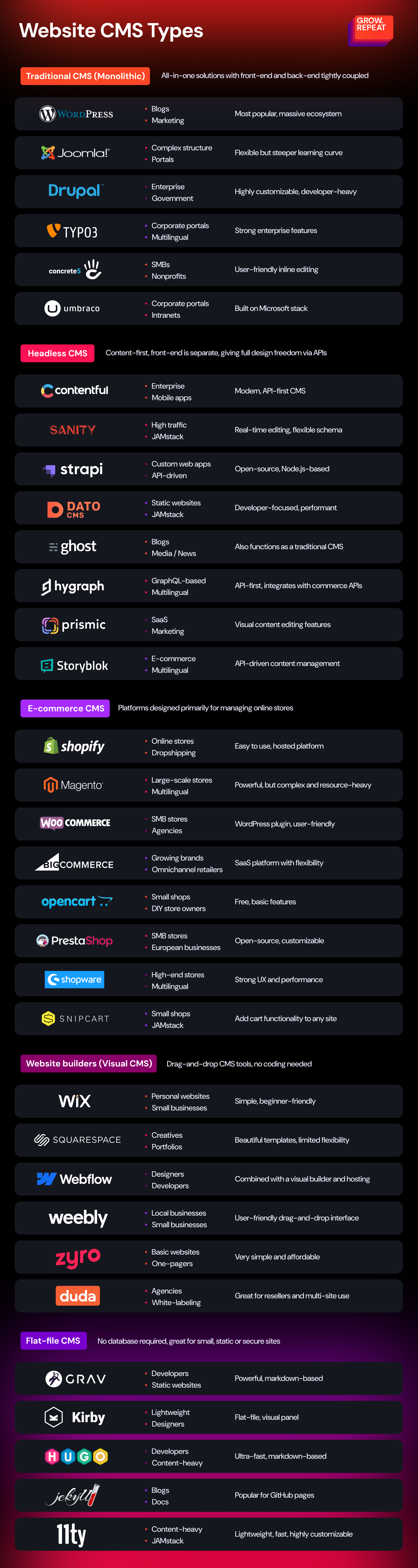
Implementing editorial workflow automation
Your content plan likely spans dozens (if not hundreds) of assets. Manually managing status, reviews, and deadlines becomes unmanageable fast. Set up automated workflows that keep content moving forward and alert the right people at the right time.
Key automation areas:
Editorial workflows: use platforms like Airtable to define content stages and automate reminders or status changes.
Approval chains: tools like Zapier, n8n, and Relay.app let you set up Slack triggers or email notifications when content moves to the next stage (for example, from "Ready for review" or "Needs editing").
CMS publishing automation: some headless CMS platforms let you auto-publish on a schedule, or push updates to multiple platforms (website, app, newsletters) simultaneously.
💡 Tip
Assign a content ops owner (someone accountable for monitoring the production queue, troubleshooting delays, and making sure workflows are respected).
Introducing AI-powered production workflows
When integrated strategically, AI can automate repetitive tasks, reduce content bottlenecks, and support scalable personalization.
Here is how you can use AI throughout the website content creation lifecycle:
.png "Info-06_Human+AIEditorialWorkflow (1)")
By customizing your CMS and leveraging AI at key stages of your production workflow, you enable your content team to focus on strategy and creativity rather than mechanics. The result: faster go-to-market, lower costs, and content that consistently supports your business goals.
8. Setting up website content analytics
With your strategy, audience insights, content structure, and roadmap in place, it’s time to ensure every piece of content can be measured, optimized, and tied back to performance.
Defining metrics that map to your website content goals
Analytics starts with clarity of purpose. If you don’t know what success looks like for each piece of content, you will end up tracking surface-level metrics that don’t inform real decisions.
To get it right, map your website content to its primary goal within the customer journey, and then assign specific, measurable KPIs that reflect performance against that goal.
Here is an example of a framework that can be used to define relevant metrics by funnel stage:
Aligning analytics with your content plan
Your analytics setup should also mirror the architecture of your content plan. This means mapping metrics directly to:
Content types and clusters (for example, feature-related pages or educational guides covering a specific topic)
Customer journey stages (awareness, consideration, decision)
Audience segments (first-time visitors vs returning users, B2B vs B2C, etc.)
Conversion paths and micro-interactions that signal user intent.
To get actionable insights, implement event-based tracking using Google Analytics + Google Tag Manager. Focus on micro-conversions and interaction data that reveal user intent and friction points.
Integrating with business tools
Website analytics should integrate tightly with your CRM, lead tracking system, or product analytics platform to make sure your website is not just driving traffic and engagement, but user action and real outcomes:
Sync UTM-tagged traffic to lead scoring models in your CRM
Analyze content influence on multi-touch conversion paths
Use first-party data to segment content engagement by account type or revenue contribution
💡 Example
If you're using HubSpot or GA4, build segments like "content-engaged users who became SQLs in the last 30 days". Then reverse-engineer which content touchpoints mattered.
By architecting your analytics setup around your content framework, you will move from assumption to evidence, and from content activity to business impact.
Conclusion: turning strategy into scalable content execution
Creating an effective website content plan isn’t just about publishing more pages, it’s about building a content system that drives business results, supports your users across their journey, and evolves with your brand.
Throughout this guide, we’ve broken down every step needed to create a high-impact website content plan template, from foundational strategy to performance analytics. If you've followed along, you now have a clear roadmap for not just what to publish, but why, for whom, and how to measure its success.
Now is the time to turn this framework into action: customize the template, align your team, and start executing with clarity and control.
If you’re looking for expert help with website development, AI automation, or a growth strategy that drives measurable results, get in touch with us. We’re here to help you move forward with clarity and confidence.

Founder & CEO at Grow.Repeat
Alina is a B2B marketing leader with 10+ years of experience driving growth through content, SEO, and funnel optimization strategies. Formerly Head of Marketing at Semrush and growth leader at Smartcat, she's led initiatives that delivered triple-digit pipeline increase and turned websites into scalable revenue engines. Alina specializes in building marketing systems that align with business goals, grounded in data and optimized for long-term impact.